DDoS protection for school websites: what actually helps
Cloudflare gives an LMS or SIS real DDoS mitigation at every tier, plus a firewall for login and enrollment forms and cheap delivery of static course files. It won't cache authenticated pages by default, and on its own it won't back anything up or make a district FERPA compliant.

"We're on Cloudflare, so we're covered."
I have heard some version of that sentence from people repeating it in good faith after a vendor call. It isn't wrong, exactly. The sentence just carries more weight than the person saying it realizes. In a school the gap between what Cloudflare covers and what people assume it covers is where the expensive surprises live.
I've had the orange cloud in front of my own sites for years, on top of managed WordPress hosting, and I've had to walk back more than one rule I turned on before thinking it through. So read this as a friendly audit. Several Cloudflare features genuinely suit a learning management system or the student information system behind it, some free. A few things people believe it does, it doesn't do at all; the features that sit unused are the other half of the story. I cover those in The Cloudflare features almost no school uses.
In short: Cloudflare gives an LMS or SIS real DDoS mitigation at every tier, plus a firewall for login and enrollment forms and cheap delivery of static course files. It won't cache authenticated pages by default, and on its own it won't back anything up or make a district FERPA compliant.
What a CDN actually does in front of an LMS or SIS
Cloudflare is a reverse proxy. Your DNS points at Cloudflare instead of your server, Cloudflare receives every request, and it decides what to do before your Moodle or Canvas or Brightspace instance hears about it. Everything on the product list is something it can do to traffic on the way past.

That framing tells you the boundary. If the risk lives on the network path, Cloudflare has a plausible answer. If it lives in a database, an identity provider, a backup schedule, or a staff password, Cloudflare is standing in the wrong hallway.
Which side of the line a risk sits on
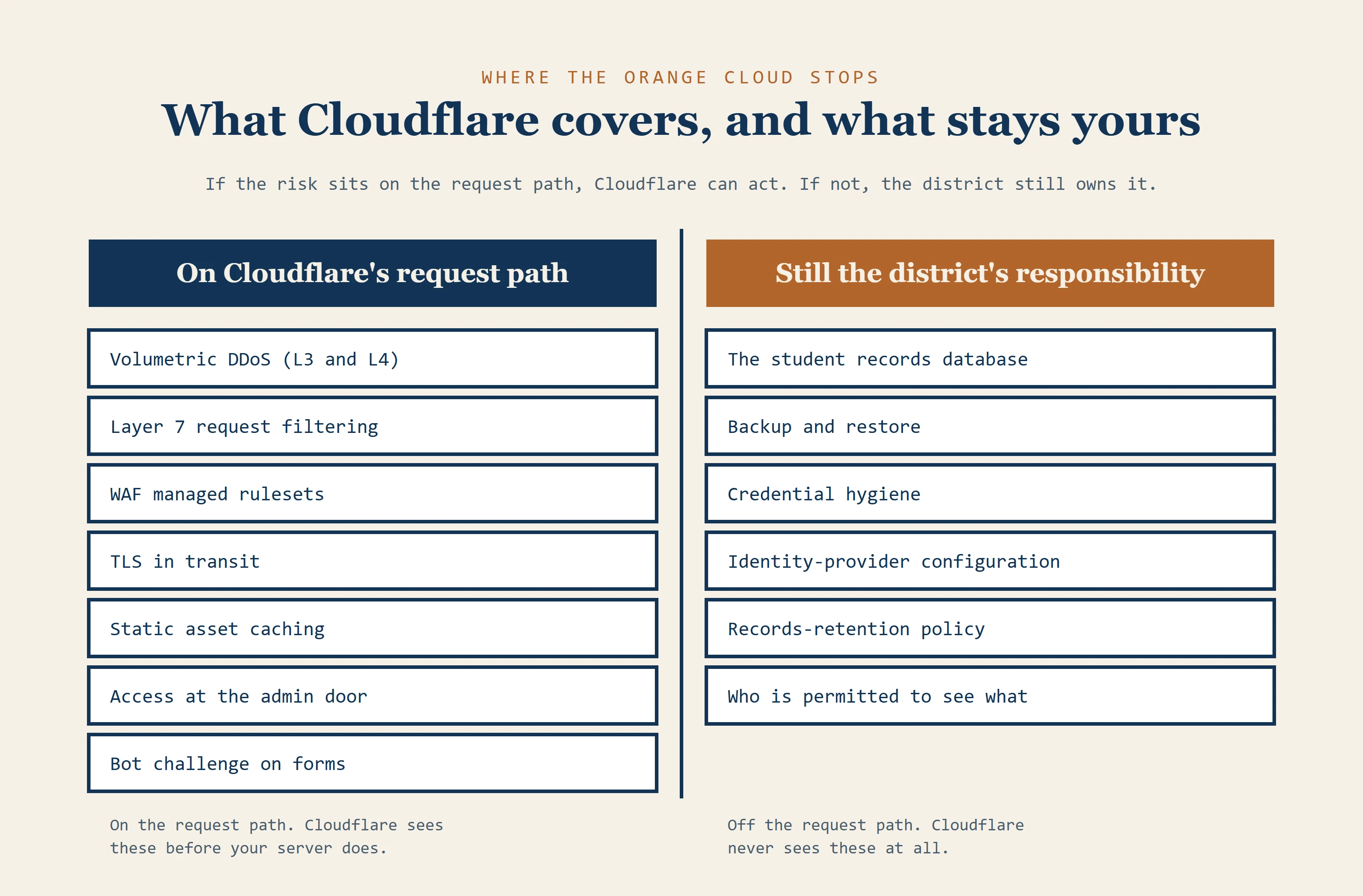 A two-region figure split by a navy vertical line. Left side, headed "On Cloudflare's request path": volumetric DDoS (L3 and L4), Layer 7 request filtering, WAF managed rulesets, TLS in transit, static asset caching, Access at the admin door, bot challenge on forms. Right side, headed "Still the district's responsibility": the student records database, backup and restore, credential hygiene, identity-provider configuration, records-retention policy, and who is permitted to see what.
The path itself is good. Cloudflare runs in 348 cities across more than 100 countries[1], putting it within roughly 50 milliseconds of about 95% of the world's internet users. For a single-campus college, that's a nice statistic. For a university with students writing exams from three continents, it's the whole argument.
Does a CDN cache student data? The part everyone gets wrong
By default, Cloudflare does not cache HTML at all, and that default is worth being glad about. Caching means storing one visitor's response and handing the same copy to the next person who asks, and a gradebook page cached and re-served isn't a performance win; it's a data breach with good response times.
Think about a school cafeteria. The coffee urn is fine to fill once and pour from all morning, because every cup out of it is identical. A plated meal with a student's name on the ticket is a different object, and if it lands on the buffet line because it happened to be ready first, someone else picks it up. Static files are the urn; authenticated pages are the plate with a name on it.
So what genuinely benefits from caching? Your JavaScript, CSS, fonts and images. Course material served without a session gate, including PDFs and SCORM packages (the zipped, self-contained course modules most LMS platforms import). Public pages such as the login screen and the course catalog. Those files are large and identical for every visitor, and together they account for most of the bytes on the page.
The Cache Rule
The operational pattern is a Cache Rule that bypasses cache when the LMS session cookie is present (figure below has the real cookie names by platform; Brightspace's are proprietary, so confirm yours against your own deployment).
| Platform | Session cookie to check |
|---|---|
| Moodle | MoodleSession |
| Canvas | canvas_session and _normandy_session |
| WordPress and LearnDash | wordpress_logged_in_* |
| Brightspace | Proprietary; confirm yours against your own deployment |
The one setting to watch
Here's the named danger, and I want to be blunt about it. A district that turns on "Cache Everything" without building that bypass list can serve one student's authenticated page to another student. The feature is doing exactly what it was told. Nobody gets an alert, and you find out when a parent calls.
The check is cheap. Load an authenticated route with your network panel open and read the cf-cache-status header. Behind a login it should say BYPASS or DYNAMIC; on a stylesheet or a course PDF it should say HIT once the edge has warmed up. A HIT on a page that greeted a student by name is a stop-everything finding.
A HIT on a page that greeted a student by name is a stop-everything finding.
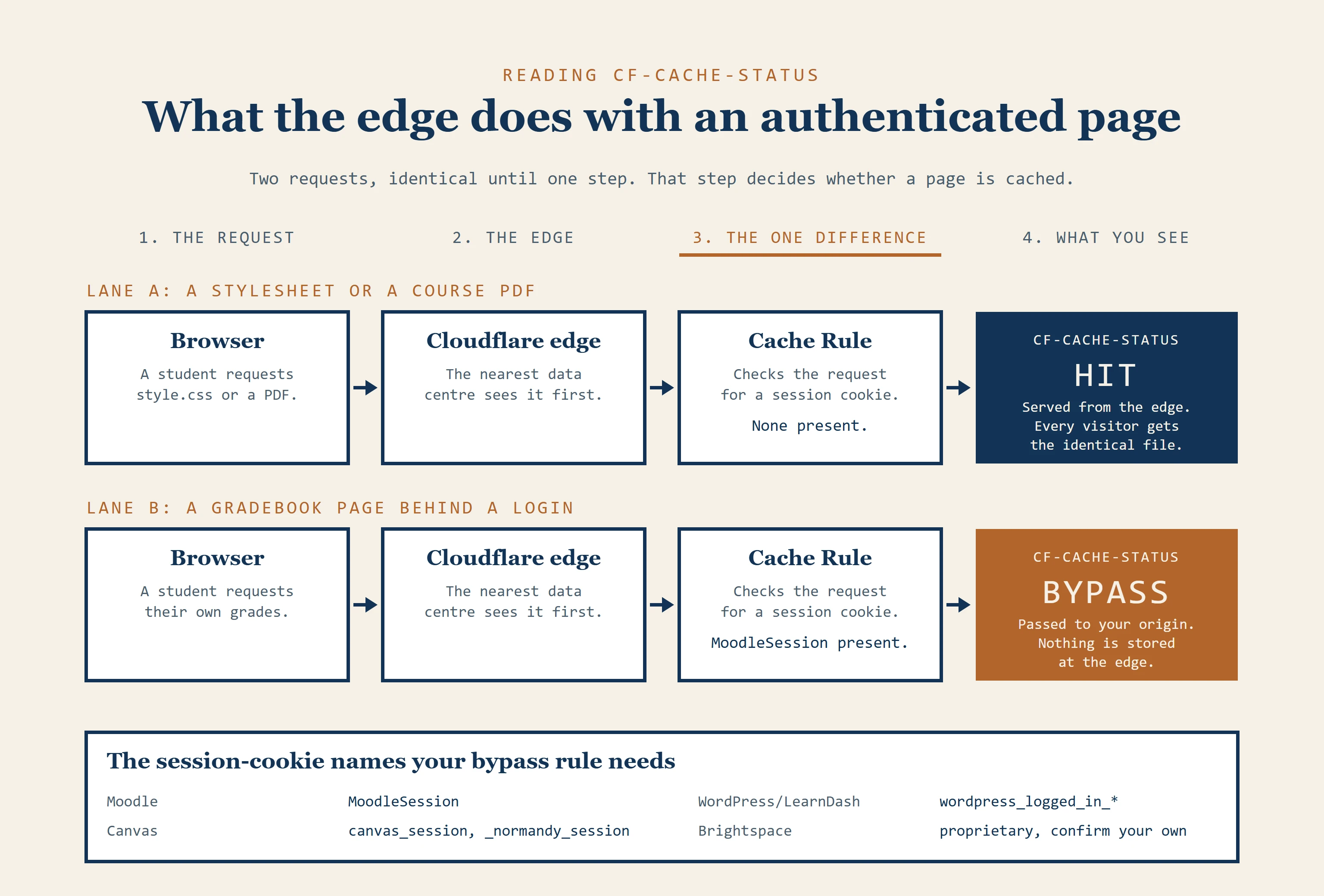 Two identical request paths, browser to Cloudflare edge to Cache Rule, diverging at one point: the presence of a session cookie. Lane A, a stylesheet or course PDF with no session cookie, ends in CF-CACHE-STATUS: HIT, served from the edge, every visitor gets the identical file. Lane B, a gradebook page with a MoodleSession cookie present, ends in CF-CACHE-STATUS: BYPASS, passed to origin, nothing stored at the edge. A reference strip below lists the session-cookie names to check by platform: Moodle MoodleSession, Canvas canvas_session and _normandy_session, WordPress and LearnDash wordpress_logged_in_*, Brightspace proprietary, confirm your own.
Is free-tier DDoS protection good enough for a school district?
Layer 3, 4 and 7 DDoS mitigation is included at every tier, including the free one. That's a real differentiator, since Azure sells its enhanced DDoS mitigation as a separate tier, and a small district that has never had edge protection gets meaningful coverage for the price of moving its DNS.
What the free tier withholds is the part procurement cares about: more than one rate-limiting rule, and any contractual uptime guarantee. Rate limiting allowances differ by plan, so I'd check the current plan comparison rather than trust a number printed last year. Whether a district needs that level of guarantee at all is a separate question, and I work through it in what high-availability WordPress requires.
So the honest answer is a size question. A single school piloting on the free tier is being sensible; a multi-campus university putting its enrollment portal behind free-tier protection during application season is under-protected, and should be pricing Business, Enterprise, or a competitor. I go deeper into that day-everything-gets-hit-at-once scenario in high-availability WordPress for education.
Will a WAF break our enrollment forms?
It can, and this is where I've caused myself the most trouble.
Cloudflare's web application firewall, or WAF, sits between the internet and your login and enrollment forms, matching requests against rulesets before they reach your server. The free tier gets a Free Managed Ruleset covering high-impact, widely exploited vulnerabilities. The full Cloudflare Managed Ruleset and the OWASP Core Rule Set (a widely used catalog of web-attack signatures maintained outside Cloudflare) start at the Pro plan. Both are aimed at the injection and scripting attacks that target login forms and APIs. That matters because an SIS holds grades, attendance, and disciplinary history, exactly why the system gets probed in the first place.
The apostrophe problem
The honest limitation is false positives on complicated forms. Enrollment and financial-aid forms are full of free-text fields, and a parent typing an apostrophe into an address field can trip an injection heuristic.
The fix is a burn-in period: run the managed rules in log mode for at least a week, longer during an active enrollment window, read what they would have blocked, and only then switch to block mode. Same instinct as testing a smoke alarm before wiring it to auto-dial the fire department. Going straight to block during open enrollment means finding out the hard way, on the applications that matter most.
While you're in there, turn on Turnstile. It replaces a CAPTCHA without the visual puzzle, it's free, and an open enrollment form invites bot-submitted fake applications. I don't have a caveat for this one.
What Cloudflare costs for lecture video: R2 versus S3
R2 is Cloudflare's object storage, and its pricing has one line that changes the arithmetic for education: egress is free[2]. Storage runs USD $0.015 per GB-month, with write and read operations priced per million and a free monthly allowance that covers small deployments outright. Confirm current numbers before they go in a budget document, but the zero-egress design is the durable part.
Where the egress bill lands
Amazon S3 charges for data leaving the bucket at roughly USD $0.09 per GB after its free allowance. A college holding 500 GB of recorded lectures pays under $15 a month for storage either way, R2 a bit less than S3, but lectures get watched repeatedly, mostly in the same two weeks of term. Serve 5 TB in a heavy month and S3 bills somewhere around $450 for handing your own students your own video; on R2 that line doesn't exist. Find your own volume in the table below, and check current rates before they go in a budget document.
Four library sizes
| Library size | R2 total (storage only; egress $0) | S3 storage | S3 egress | S3 total | S3 costs you extra |
|---|---|---|---|---|---|
| 500 GB | $7.50 | $11.50 | $45.00 | $56.50 | +$49.00 |
| 1 TB | $15.00 | $23.00 | $90.00 | $113.00 | +$98.00 |
| 5 TB | $75.00 | $115.00 | $450.00 | $565.00 | +$490.00 |
| 20 TB | $300.00 | $460.00 | $1,800.00 | $2,260.00 | +$1,960.00 |
Each row assumes the whole library is stored for the month and served once. Rates used: R2 storage $0.015/GB-month, R2 egress $0. S3 Standard storage $0.023/GB-month, S3 egress $0.09/GB (before any free-tier allowance). Confirm current rates at Cloudflare R2 pricing[2] and AWS S3 pricing[3] before they go in a budget document, prices move.
What the table leaves out
Two qualifications. R2 is object storage and nothing more; transcoding and thumbnails come from Cloudflare Stream, a separate product with separate pricing. And pointing an LMS at external storage is an integration project with a cost of its own, which belongs in the same spreadsheet as the savings, the total-cost math I walk through in what a Moodle LMS actually costs.
Zero Trust for SIS admin tools instead of a VPN
The feature I'd look at first is Cloudflare Access. It puts a back-office tool behind your existing identity provider, Google Workspace for Education or Entra ID, over SAML or OIDC (standard single-sign-on protocols), so reaching the admin interface requires a login against your own directory before the request touches the application.
The fit is unusually clean. A small IT and registrar team guarding a high-value application is exactly the shape Zero Trust was designed around, and it retires the VPN half your staff have forgotten how to connect to. The free tier covers a small admin team; check the current seat pricing above that before you budget. The target is the enrollment console, the reporting tool, and whatever dashboard your SIS integration exposes, which can be the same layer where enrollment sync and progress reporting live.
Does a CDN or firewall make a district FERPA compliant?
No, and the distinction matters more than it sounds.
Inputs for a vendor review
Cloudflare provides infrastructure that can support a compliant posture. Encryption in transit is real, and so is lowering breach odds through DDoS mitigation and a firewall. Data-residency controls exist at the Enterprise tier for institutions that need processing kept inside a jurisdiction. Cloudflare publishes standard certifications like SOC 2 and ISO 27001, legitimate inputs to a vendor review.
As far as I can determine, no FERPA certification exists for a vendor to hold in the first place. FERPA compliance is a question about how your institution handles education records: who sees them, under what authority, kept how long, and what happens when a parent asks. Those answers live with your counsel and your records officer. A datasheet is evidence in that conversation; your counsel writes the actual conclusion.
Canadian institutions ask a version of the same question under provincial privacy legislation rather than FERPA, and the split works the same way there: infrastructure lowers risk, your own policy answers for how records are handled.
To a board, I'd put it this way: Cloudflare can make it less likely that student records are exposed by an attack on the network path, but it can't tell you whether you're permitted to store them the way you do.
Accessibility and the other gaps
The same split shows up in accessibility. A vendor can sell you a script, but conformance is still a claim your institution makes, which is where the next piece in this series goes: do accessibility overlay widgets work on an LMS?
Two related gaps get assumed away as well. Cloudflare has no visibility into your database, so a stolen credential used against your origin walks straight past the edge. It does nothing for durability either; sitting behind the orange cloud won't restore a corrupted grade table. Name yesterday's restore point from memory, or that's the more urgent project.
When a different provider is the better call
Cloudflare isn't automatically the answer, and I'd be wary of anyone in edtech who says otherwise.
Already inside a Microsoft education enterprise agreement: Azure Front Door deserves a serious look on procurement grounds alone. M365 Education, Entra ID and Azure hosting are already contracted and supported, and your team knows who to call when one misbehaves. Adding Cloudflare means a second vendor, a second invoice, and a second place to look at three in the morning, which is a legitimate reason to stay put.
A public university with a large enrollment portal and a real budget for protection: AWS Shield Advanced adds a cost-protection guarantee against attack-driven billing spikes, plus a named response team you can contractually engage during an incident. It's expensive, and it's the honest option when an institution needs a phone number and an SLA. At that budget the real comparison is Shield Advanced against Cloudflare Enterprise, not Cloudflare's cheaper tiers.
Cache control and the baseline
Wanting fine-grained programmatic control over cache invalidation: Fastly documents purging by surrogate key, the kind of control that question is after. It matters less for an LMS than for a newsroom, since your cacheable surface is mostly static assets that change on deploy.
The baseline nobody names in vendor meetings: a district running origin-only has a public enrollment portal exposed directly to the internet with nothing in front of it. Against that starting point, any competent edge layer is a real improvement, and Cloudflare's free tier is the cheapest way out. A better-funded institution might choose differently; that changes nothing for a district that has nothing.
Common questions
Does Cloudflare replace our backups?
No. It sits on the network path and has no role in data durability. A corrupted or ransomware-encrypted origin database is delivered just as fast. Backup and restore stay with your hosting provider and your own snapshot policy.
Are Cloudflare Workers worth it for a school?
Sometimes, but be realistic. The relevant uses are narrow: validating an auth token at the edge during peak enrollment, redirecting legacy course URLs after a migration, and edge personalization of content carrying no student data, the third being easier to propose than to build. All three are development projects with ongoing ownership, not dashboard toggles.
Email, bots and hosted vendors
Does Cloudflare secure our email?
Cloudflare DNS can host your SPF, DKIM and DMARC records for free, and Email Routing will forward addresses on your domain. That's DNS infrastructure, and it's where it stops. Gateway-level phishing defense is a separate paid product, Cloudflare Email Security, formerly Area 1.
Can Cloudflare stop bots from filing fake applications?
The free Bot Fight Mode issues a blunt challenge and carries false-positive risk against your own legitimate automation, like uptime monitoring. Paid tiers add granularity, up to Enterprise's machine-learned scoring. For a district with open enrollment the practical answer is simpler: Turnstile on the form.
Our vendor hosts our LMS. Can we still use Cloudflare?
Yes, if you control the DNS for the hostname students visit, but check the contract first. Some hosted vendors may run their own edge and decline to support a proxy in front of theirs, or may decline to troubleshoot when one is present. Have that conversation at renewal, before anyone touches the dashboard.
Where to start on Monday
Open your Cloudflare dashboard and load a page a student sees after logging in. Read the cf-cache-status header. Then find out whether anyone's ever run the managed firewall rules in log mode, and whether the enrollment portal is protected by anything other than hope during application season. Those two checks take an afternoon and tell you more about your posture than any vendor comparison chart.
The answers may well be fine. The harder finding is that nobody in the building can say who configured it, or when.
Checked against Cloudflare's managed rules, DDoS, rate limiting, cache, Turnstile and R2 pages, Microsoft's Azure Front Door page, and AWS's Shield page and S3 free-allowance terms, on 2026-10-11.
References
- Cloudflare, global network coverage
- Cloudflare, R2 storage pricing
- Amazon Web Services, Amazon S3 pricing
- Cloudflare, DDoS protection
- Cloudflare, WAF managed rules
- Cloudflare, Rate limiting rules
- Cloudflare, Default cache behavior
- Cloudflare, Cache response statuses
- Cloudflare, Turnstile plans
- Cloudflare, Access policies
- Cloudflare, Identity provider integration
- Cloudflare, Bot Fight Mode
- Cloudflare, Cloudflare certifications
- Amazon Web Services, AWS Shield features
- Microsoft, DDoS protection on Azure Front Door
- U.S. Department of Education, FERPA, Student Privacy Policy Office
- Information and Privacy Commissioner of Ontario, FIPPA and MFIPPA